
Quick Start: Site Tour
This page is a short tour of Opteryx Studio, the web app for opteryx.app, the hosted Opteryx service — what each part of the workspace is for and how to use it. If you haven't signed in yet, start with Logging In; Studio drops you straight into an example query, pre-loaded and ready to run, so there's no setup before you see it working.
If you're looking to embed the Opteryx engine directly in a Python process instead of using the hosted service, see Querying Local Data.
The Studio workspace
Once you're signed in, Studio opens as a single screen — everything below happens in one place, with nothing else to navigate to:
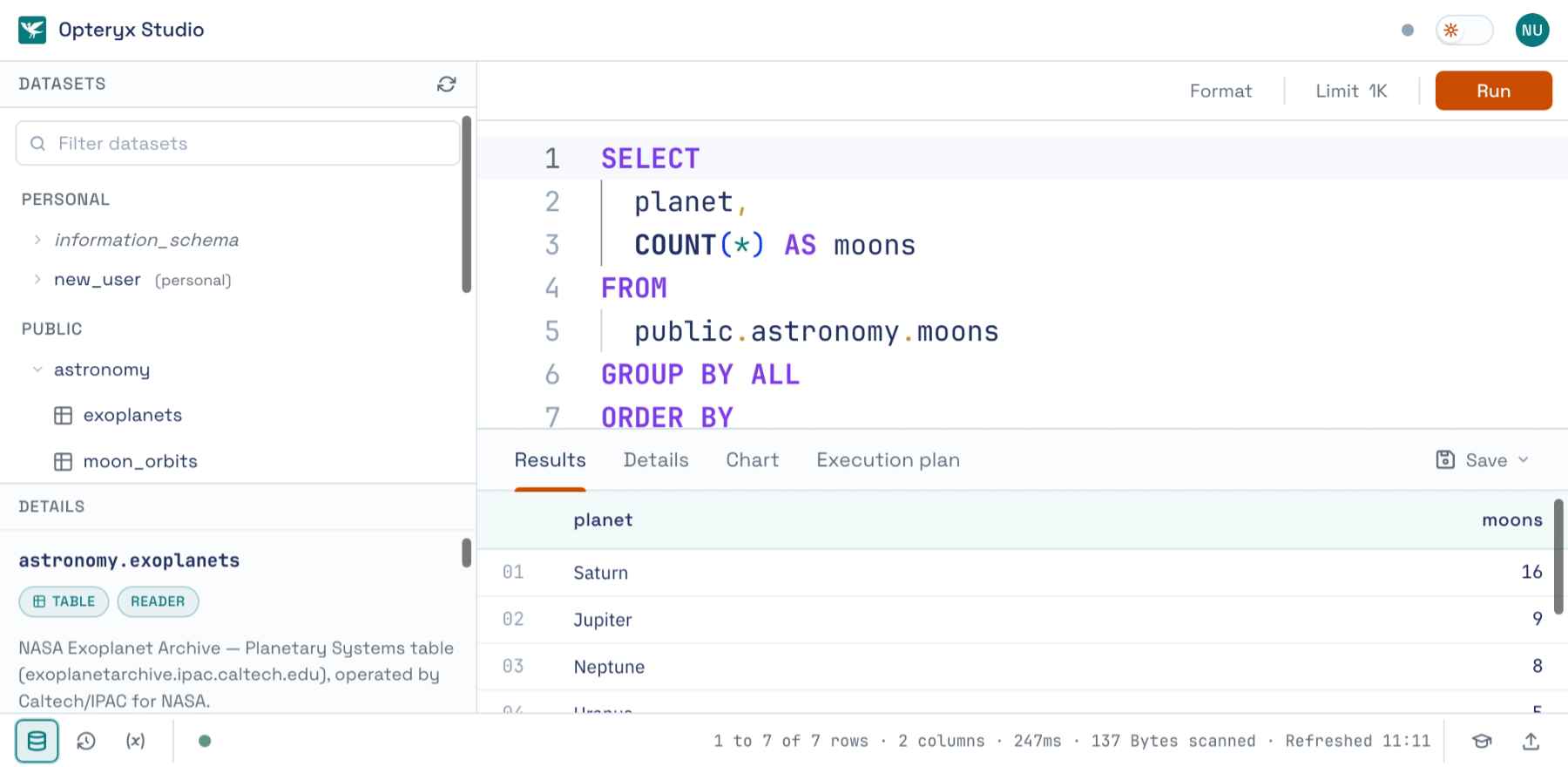
Working across the screenshot above:
- Catalog (left) — everything you can query, split into
personal(your own uploads) andpublic(shared sample data), grouped by schema. Click a table, likeastronomy.exoplanetshere, and its row count, size, and columns appear in the Details panel underneath. - SQL editor (top center) — write your query here. Format cleans up whitespace, Run (⌘↵ / Ctrl+Enter) executes.
- Results (below the editor) — rows land here once the query finishes. Details, Chart, and Execution plan sit alongside it, showing timing and bytes scanned, a plot of any numeric columns, and how Opteryx executed the query.
- Reference panel (right, toggled with the graduation-cap icon) — SQL basics and a searchable function list, handy while you're still learning the dialect.
- Along the bottom, Datasets and Recent queries toggle the catalog and query-history panels. Settings — including the API tokens for programmatic access — live under your avatar in the top-right corner (see Logging In).
A handful of datasets under the public schema — including astronomy.moons, queried in the screenshot above — are readable by anyone signed in, with no upload required. See Load and Query Data for the full list, and for what else public includes (geopolitical, security, and sales reference tables).
Next steps
- Load and Query Data — load your own files into Opteryx and query them back with SQL
- Running a Query via the API — submit SQL over HTTP instead of using the Studio editor
- Querying via OData — filterable reads with no client code
- Querying Local Data — embed the Opteryx engine in your own Python process instead of using the hosted service
Need Help?
If something isn't working, or a step here didn't do what you expected, raise a bug or ask a question. Getting help covers what to include, and where to report a security issue.