
Jupyter
Jupyter notebooks (JupyterLab, Notebook, VS Code and Colab) are where most interactive Python analysis happens. Opteryx works there in two ways. Opteryx Core runs inside the notebook kernel and queries local files, with no account and no server. opteryx-sqlalchemy queries opteryx.app, the hosted service, and returns pandas DataFrames.
Prerequisites
- Python 3.11 or later
- For local files: nothing else. The example downloads a small public Parquet file.
- For opteryx.app: a client ID and client secret from the Authentication API
Install
pip install jupyterlab opteryx-core pyarrow pandas matplotlibFor the hosted service, add the SQLAlchemy dialect. jupysql is optional and provides the %sql magic:
pip install opteryx-sqlalchemy jupysqlLocal Files with Opteryx Core
Download the sample dataset, 4,630 orbital launch attempts, into ./data/missions/ next to your notebook:
mkdir -p data/missions
curl -L -o data/missions/space_missions.parquet \
  https://raw.githubusercontent.com/mabel-dev/opteryx-core/main/testdata/missions/space_missions.parquet
Connection configuration
There is no connection. Register a workspace that maps the data prefix to the ./data folder, and define a helper that returns a DataFrame:
import opteryx
import pyarrow
from opteryx.connectors import DiskConnector

opteryx.register_workspace("data", DiskConnector)


def query(sql, params=None):
    morsels = opteryx.session().execute_to_morsels(sql, params)
    return pyarrow.concat_tables(m.to_arrow() for m in morsels).to_pandas()
data.missions now reads the Parquet files in ./data/missions/. See Querying Local Data for how names map to folders.
Minimal working example
per_year = query("""
    SELECT CAST(EXTRACT(year FROM Lauched_at) AS INTEGER) AS year,
           COUNT(*)                                       AS launches
      FROM data.missions
     WHERE Lauched_at IS NOT NULL
     GROUP BY year
     ORDER BY year
""")
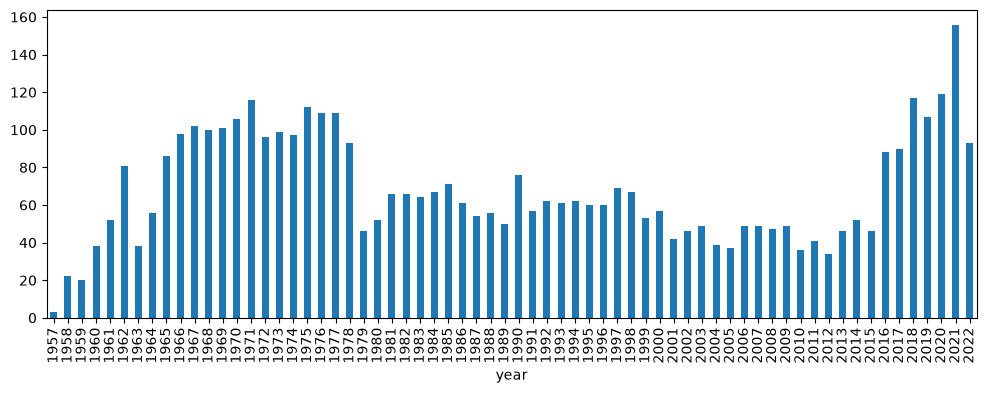
per_year.plot(x="year", y="launches", kind="bar", figsize=(12, 4), legend=False)
This draws the chart above. (Lauched_at is spelled that way in the file.) 127 launches in the file have no date, so the WHERE clause leaves them out. Without it they show up as a nan bar, and pandas turns year into a float column to hold the missing value.
Pass values as ? parameters rather than formatting them into the SQL:
query(
    "SELECT Company, COUNT(*) AS n FROM data.missions WHERE Mission_Status = ? GROUP BY Company ORDER BY n DESC LIMIT 5",
    ["Success"],
)
The top row is RVSN USSR with 1,614 successful launches.
opteryx.app with SQLAlchemy
Connection configuration
Keep the credentials out of the notebook. Set them as environment variables before you start Jupyter, or read them from a secrets store such as Colab Secrets:
import os
from urllib.parse import quote

from sqlalchemy import create_engine

client_id = quote(os.environ["OPTERYX_CLIENT_ID"], safe="")
client_secret = quote(os.environ["OPTERYX_CLIENT_SECRET"], safe="")
engine = create_engine(f"opteryx://{client_id}:{client_secret}@opteryx.app:443/default?ssl=true")
Minimal working example
Into pandas:
import pandas

df = pandas.read_sql_query("SELECT name, mass FROM opteryx.test.planets ORDER BY mass DESC", engine)
df.head(3)
The first row is Jupiter, with a mass of 1898.0.
With the %sql magic, pass the engine you created above:
%load_ext sql
%sql engine --alias opteryx%%sql
SELECT name, gravity
FROM opteryx.test.planets
WHERE gravity > 10
ORDER BY gravity DESCThis returns Jupiter (23.1) and Neptune (11.0). To get a DataFrame from the magic, assign the result and call .DataFrame():
result = %sql SELECT COUNT(*) AS n FROM opteryx.test.planets
result.DataFrame()
Known Limitations and Troubleshooting
- Aggregate before you pull. Opteryx can scan more data than fits in memory, but a DataFrame can't. Group and filter in SQL so only the summary reaches the notebook. Exploratory Analysis in Notebooks covers this pattern in more depth.
- Read-only. The SQLAlchemy dialect doesn't support writes.
Authentication error: Missing bearer tokenmeans the engine URL has no credentials. Check that both environment variables are set in the environment Jupyter was started from.Dataset `data.missions` cannot be foundmeans the kernel's working directory isn't the folder that containsdata/. Check it withimport os; os.getcwd().