
Apache Superset
Apache Superset is an open-source BI tool for SQL exploration, charts and dashboards. Use it with Opteryx when you want shared, browser-based dashboards over data in opteryx.app, the hosted service. Superset connects through the opteryx-sqlalchemy dialect, so every chart is a live query against Opteryx with no extract step.
Prerequisites
- A running Superset. These steps were tested with the official
apache/supersetDocker images, versions 5.0.0 and 6.0.0. - An opteryx.app client ID and client secret. Create a client credential with the Authentication API. Superset can't connect anonymously.
Install
Install opteryx-sqlalchemy into the same Python environment that Superset runs in. If you run Superset with pip, that is:
pip install opteryx-sqlalchemyWith the official Docker image, add it in a small image of your own:
FROM apache/superset:6.0.0
USER root
RUN . /app/.venv/bin/activate && uv pip install --no-cache opteryx-sqlalchemy
USER superset
Restart Superset after installing so it picks up the new dialect.
Connection Configuration
In Superset, go to Settings → Database Connections and click + Database. Under Supported databases, choose Other. Set Display Name to Opteryx and enter this SQLAlchemy URI:
opteryx://YOUR_CLIENT_ID:YOUR_CLIENT_SECRET@opteryx.app:443/default?ssl=true
The username and password slots carry the client ID and client secret. Click Test connection, then Connect. Superset stores the secret encrypted in its metadata database and masks it in the UI.
If the client secret contains characters such as @, : or /, URL-encode it first, for example with urllib.parse.quote(secret, safe="") in Python.
Minimal Working Example
Open SQL → SQL Lab, pick the Opteryx database, and run:
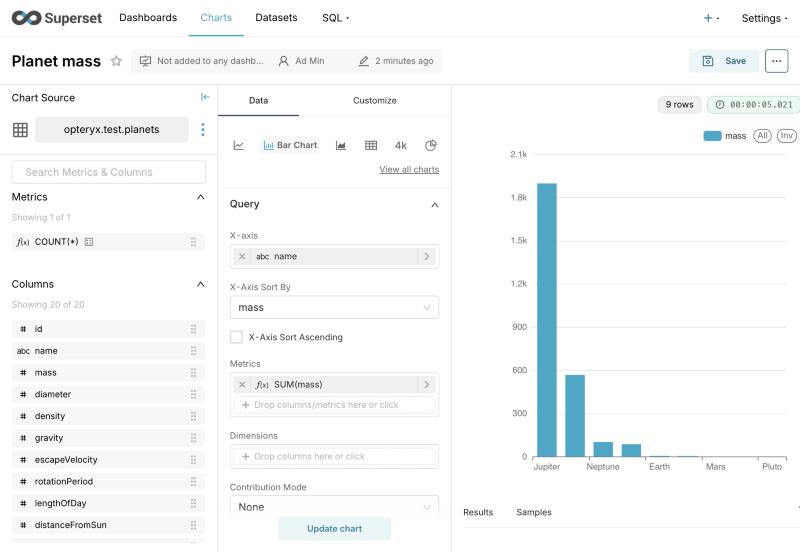
sqlSELECT name, mass FROM opteryx.test.planets ORDER BY mass DESCThe result has nine rows, starting with Jupiter (1898.0), Saturn (568.0) and Neptune (102.0).
Go to Datasets → + Dataset. Choose the Opteryx database, the schema
opteryx.testand the tableplanets. Superset shows Opteryx schemas asworkspace.collection, and only lists the ones your credential can read.Create a Bar Chart on the dataset with X-axis
name, MetricSUM(mass)and X-Axis Sort Bymass. The chart in the screenshot above is the result.
Known Limitations and Troubleshooting
Superset doesn't ship an Opteryx engine spec yet, so it treats Opteryx as a generic SQLAlchemy database. Most of SQL Lab and charting works. Time-series charts need two workarounds:
No time grains. The Time Grain dropdown is empty, and choosing a grain fails with
No grain spec for PT1H for database base. Bucket the timestamp in a virtual dataset instead, and leave Time Grain empty:SELECT DATE_TRUNC('hour', date_added) AS hour, SUM(articles) AS articles FROM demo.geopolitics.gdelt_coverage_by_batch WHERE date_added >= NOW() - INTERVAL '7' DAY GROUP BY DATE_TRUNC('hour', date_added)Time range filters fail. A time range other than No filter fails with
column *virtual_table.hour* (`TIMESTAMP[us]`) and literal `...` (`VARCHAR`) cannot be compared, because Superset sends the range bounds as strings. Put the date restriction in the dataset's SQL, as in theWHEREclause above, and keep the chart's time range at No filter.
Other things to know:
- Read-only. The dialect doesn't support writes, so CSV upload and CREATE TABLE AS from SQL Lab don't work.
Can't load plugin: sqlalchemy.dialects:opteryxwhen testing the connection meansopteryx-sqlalchemyisn't installed in the environment Superset runs in. Check that you installed it into Superset's virtual environment, or rebuilt the Docker image, and restarted.Authentication error: Missing bearer tokenmeans the URI has no credentials. Check that the client ID and secret are in the URI.- Charts are live queries. Every chart refresh runs a query on opteryx.app. Aggregate in the dataset or chart rather than charting raw rows, and use Superset's chart cache for dashboards that many people open.