
marimo
marimo is a reactive Python notebook: when a widget or a cell changes, every cell that depends on it reruns. Notebooks are stored as plain .py files, and can run as scripts or be served as apps. With Opteryx, a slider or dropdown can drive a SQL query and the results update as you move it. Opteryx Core queries local files in-process, and opteryx-sqlalchemy connects marimo's mo.sql to opteryx.app, the hosted service.
Prerequisites
- Python 3.11 or later
- For local files: nothing else. The example downloads a small public Parquet file.
- For opteryx.app: a client ID and client secret from the Authentication API
Install
pip install marimo opteryx-core pyarrow pandasFor the hosted service, add the SQLAlchemy dialect:
pip install opteryx-sqlalchemyLocal Files with Opteryx Core
Download the sample dataset, 4,630 orbital launch attempts, into ./data/missions/:
mkdir -p data/missions
curl -L -o data/missions/space_missions.parquet \
  https://raw.githubusercontent.com/mabel-dev/opteryx-core/main/testdata/missions/space_missions.parquet
Connection configuration
There is no connection. The first cell registers a workspace that maps the data prefix to the ./data folder, and defines a helper that returns a DataFrame. See Querying Local Data for how names map to folders.
Minimal working example
Save this as missions.py:
import marimo

app = marimo.App()


@app.cell
def _():
    import marimo as mo
    import opteryx
    import pyarrow
    from opteryx.connectors import DiskConnector

    opteryx.register_workspace("data", DiskConnector)

    def query(sql, params=None):
        morsels = opteryx.session().execute_to_morsels(sql, params)
        return pyarrow.concat_tables(m.to_arrow() for m in morsels).to_pandas()

    return mo, query


@app.cell
def _(mo):
    years = mo.ui.range_slider(start=1957, stop=2022, value=[1990, 2022], label="Years")
    years
    return (years,)


@app.cell
def _(query, years):
    first, last = years.value
    by_company = query(
        """
        SELECT Company, COUNT(*) AS launches
          FROM data.missions
         WHERE CAST(EXTRACT(year FROM Lauched_at) AS INTEGER) BETWEEN ? AND ?
         GROUP BY Company
         ORDER BY launches DESC
         LIMIT 10
        """,
        [first, last],
    )
    by_company
    return


if __name__ == "__main__":
    app.run()
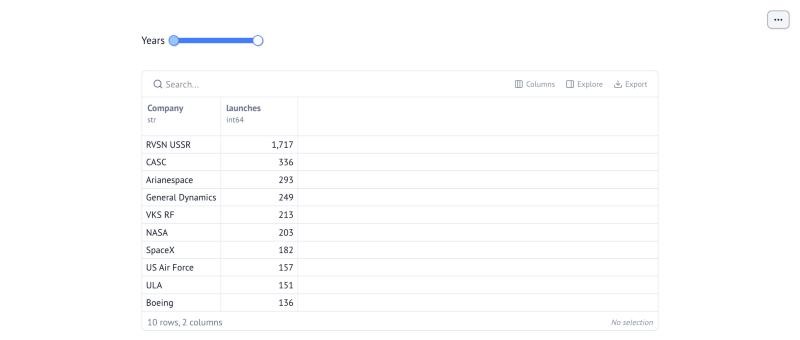
Open it with marimo edit missions.py, or serve it as a read-only app with marimo run missions.py. With the default range (1990 to 2022), CASC tops the table with 305 launches. Drag the slider's start back to 1957 and the third cell reruns: RVSN USSR moves to the top with 1,717.
The slider values go into the query as ? parameters, not with an f-string, so nothing from a widget becomes part of the SQL text.
opteryx.app with mo.sql
marimo's mo.sql runs SQL against a SQLAlchemy engine and returns a DataFrame, which marimo shows as an interactive table.
Connection configuration
Read the credentials from environment variables so they stay out of the notebook file:
import os
from urllib.parse import quote

from sqlalchemy import create_engine

client_id = quote(os.environ["OPTERYX_CLIENT_ID"], safe="")
client_secret = quote(os.environ["OPTERYX_CLIENT_SECRET"], safe="")
engine = create_engine(f"opteryx://{client_id}:{client_secret}@opteryx.app:443/default?ssl=true")
Minimal working example
import marimo

app = marimo.App()


@app.cell
def _():
    import os
    from urllib.parse import quote

    import marimo as mo
    from sqlalchemy import create_engine

    client_id = quote(os.environ["OPTERYX_CLIENT_ID"], safe="")
    client_secret = quote(os.environ["OPTERYX_CLIENT_SECRET"], safe="")
    engine = create_engine(f"opteryx://{client_id}:{client_secret}@opteryx.app:443/default?ssl=true")
    return engine, mo


@app.cell
def _(mo):
    min_mass = mo.ui.number(start=0, stop=2000, value=50, label="Minimum mass")
    min_mass
    return (min_mass,)


@app.cell
def _(engine, min_mass, mo):
    planets = mo.sql(
        f"""
        SELECT name, mass
          FROM opteryx.test.planets
         WHERE mass > {int(min_mass.value)}
         ORDER BY mass DESC
        """,
        engine=engine,
    )
    return (planets,)


if __name__ == "__main__":
    app.run()
With the default minimum of 50, the table lists Jupiter, Saturn, Neptune and Uranus.
Known Limitations and Troubleshooting
- Opteryx Core isn't a
mo.sqlengine.mo.sqlneeds a SQLAlchemy engine or another engine marimo supports, and Opteryx Core has neither. Query local files from Python cells with a helper likequery()above. mo.sqltakes the query as a single string, with no separate parameters, so the hosted example formats the value into the SQL. Only do that with values coerced to a known type, asint(min_mass.value)is here, and never with free text from a widget. For free text, run the query from a Python cell with bound parameters instead, as in Parameterising Queries.- Every change reruns the query. A slider can fire many queries while it's being dragged. Keep queries aggregated, or put the widget in a
mo.ui.formso the query runs only when it's submitted. Authentication error: Missing bearer tokenmeans the engine URL has no credentials. Check that both environment variables are set in the shell you started marimo from.Dataset `data.missions` cannot be foundmeans marimo was started from a different folder. Runmarimo editfrom the folder that containsdata/.